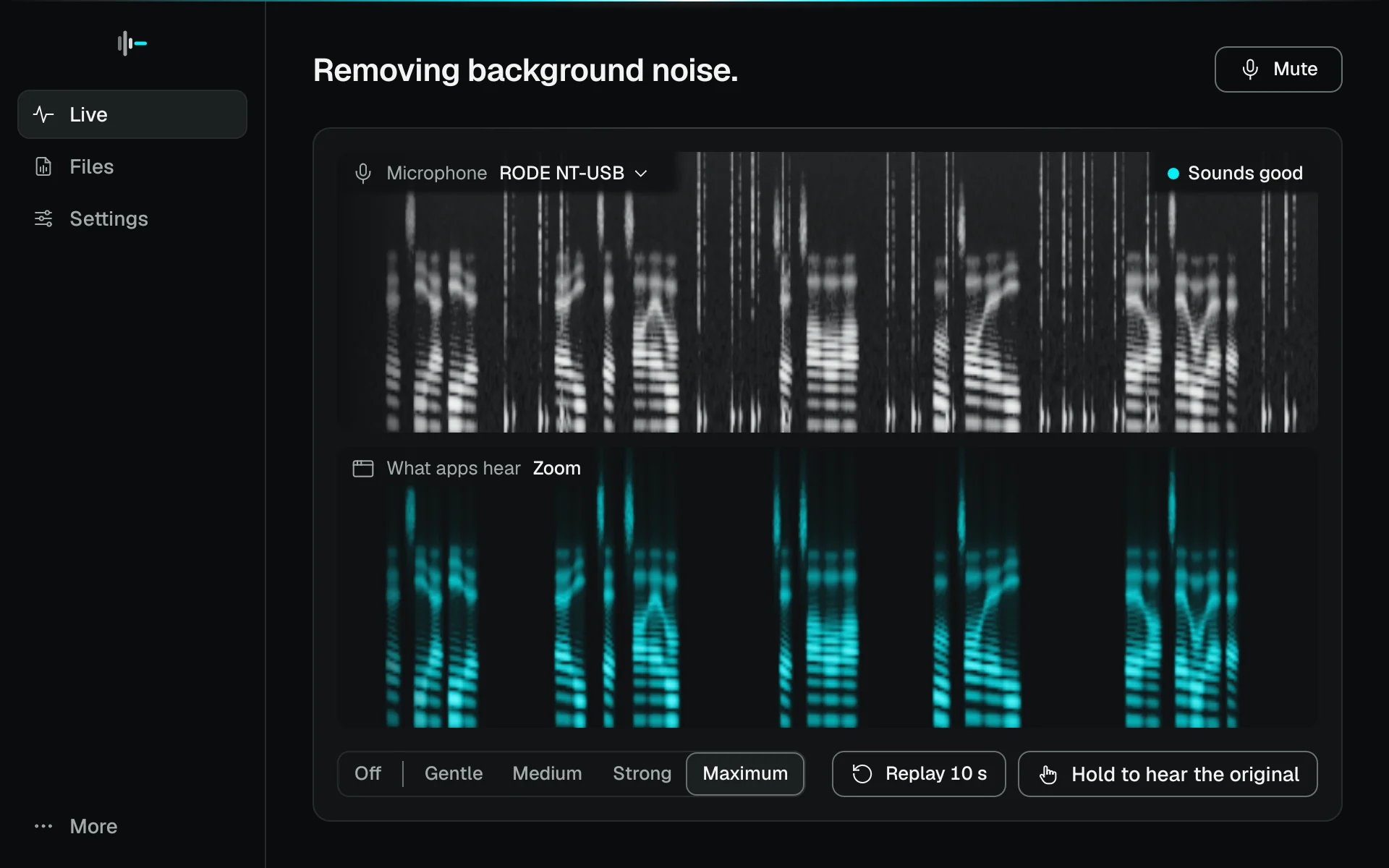
Live
See what your apps hear.
Your microphone above, what the call gets below. The noise is simply missing.
- Replay the last 10 seconds and compare with your original
- Change the strength or mute without dropping the call
HushMic removes keyboard, fan and café noise from your microphone in real time. On your own machine, in every app.
Noise suppression is off.
Play a sample to hear the difference.
Keyboard sample: 25–27 dB less noise in the pauses, measured.
HushMic removes keyboard, fan and café noise from your microphone in real time. On your own machine, in every app.
Noise suppression is off.
Play a sample to hear the difference.
Keyboard sample: 25–27 dB less noise in the pauses, measured.
Best with headphones. The first Play loads the sample (0.2 MB).
How it works
01 · Input
Keyboard, fan, café chatter. All of it goes in.
02 · HushMic
DPDFNet, a neural speech model, on your own CPU.
03 · Output
Discord, TeamSpeak, OBS, your browser. Pick HushMic as the microphone.
How it works
01 · Input
Keyboard, fan, café chatter. All of it goes in.
02 · HushMic
DPDFNet, a neural speech model, on your own CPU.
03 · Output
Discord, TeamSpeak, OBS, your browser. Pick HushMic as the microphone.
The app
Live
Your microphone above, what the call gets below. The noise is simply missing.
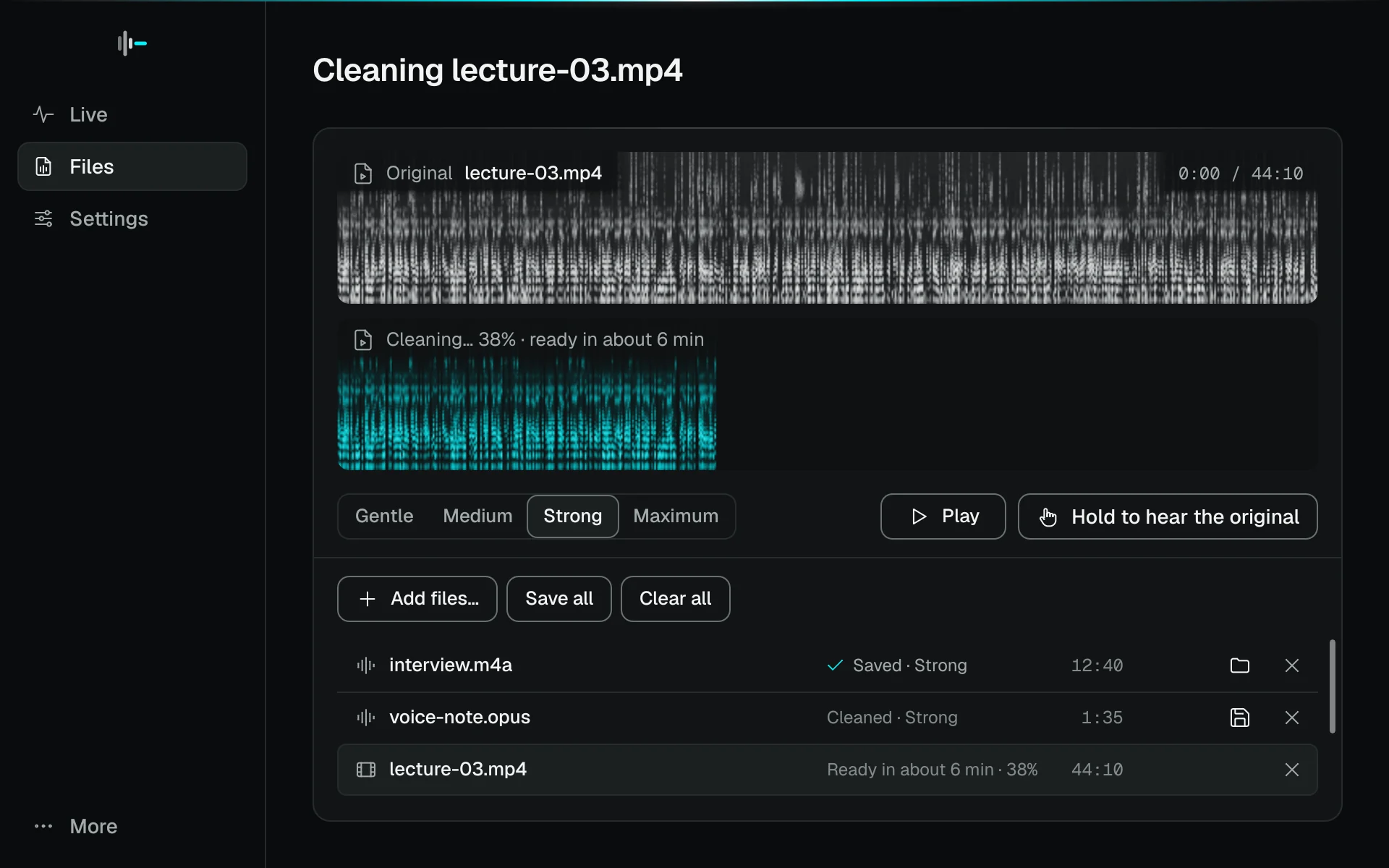
Files
Audio or video, one file or a whole folder. Each cleaned copy is saved next to its original.
Or clean one right here in your browser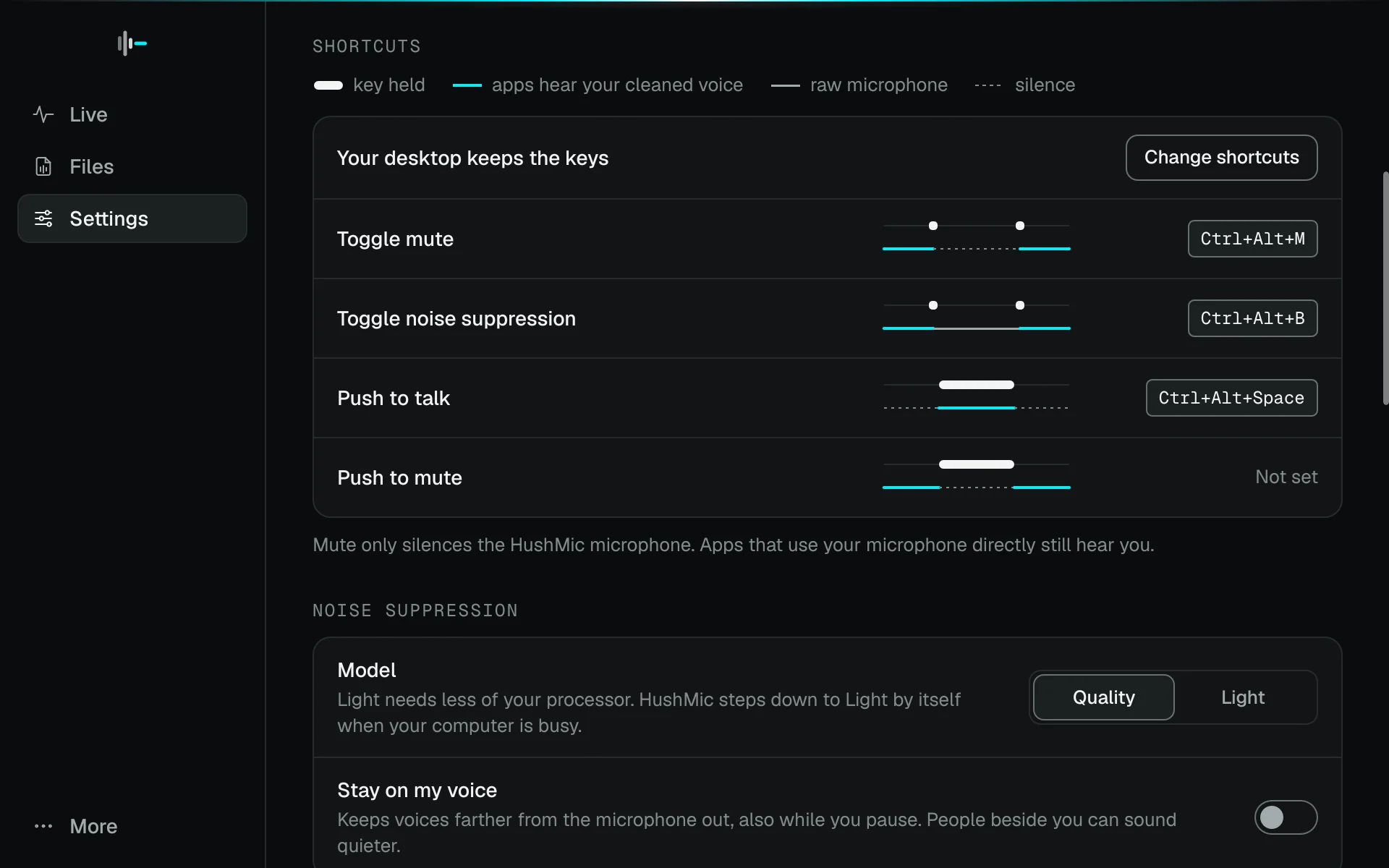
Settings
Global shortcuts for mute, push to talk and push to mute. Stay on my voice keeps voices from across the room out.
Everything runs on your own computer. No account, and nothing is uploaded.
About a tenth of one processor core, and a lighter model when the computer gets busy.
Load HushMic’s model in EasyEffects’ Deep Noise Remover, on your microphone or on what you hear.
The app
Live shows your microphone and what goes out, and replays your last 10 seconds.
Files takes the noise out of audio and video you already have.
Mute, push to talk and push to mute from any app, or a systemd user service.
Runs on your own computer. No account, nothing uploaded.
About a tenth of one processor core, and a lighter model when the computer is busy.
Load HushMic’s model in its Deep Noise Remover.
Measured
DNSMOS P.835 overall quality, averaged over three noisy clips: keyboard, fan and café. The scale runs from 1 to 5; higher is better. DPDFNet is an Apache-2.0 model by Ceva.
Three constructed clips with one voice. An estimate that explains our choice, not a ranking of the other projects.
How we measuredNo. Everything runs on your CPU and nothing is uploaded.
80 ms of processing, plus PipeWire’s own buffering. On PipeWire 1.6 and later, apps like OBS can compensate for it. On a desktop CPU with AVX2 the quality model takes about 10 % of one core, and about 7 % on newer ones with AVX-VNNI. Slow CPUs fall back to the light model on their own.
HushMic keeps speech, so a voice from across the room can come through, mostly while you pause. Turn on Stay on my voice in Settings: it keeps voices farther from the microphone out, also while you pause. People right beside you can sound quieter with it.
No. Switching happens inside HushMic: your call app keeps the same microphone, so the call stays connected. Mute silences the HushMic microphone only: an app that uses your physical microphone directly still hears you.
Yes. EasyEffects can load HushMic’s plugin as the DPDFNet model of its Deep Noise Remover, on your microphone and on what you hear. Install HushMic from a package, then pick the model in EasyEffects.
FAQ
No. Everything runs on your CPU and nothing is uploaded.
80 ms of processing, plus PipeWire’s own buffering. On PipeWire 1.6 and later, apps like OBS can compensate for it. On a desktop CPU with AVX2 the quality model takes about 10 % of one core, and about 7 % on newer ones with AVX-VNNI. Slow CPUs fall back to the light model on their own.
DNSMOS P.835 overall quality, averaged over three noisy clips: keyboard, fan and café. The scale runs from 1 to 5; higher is better. DPDFNet is an Apache-2.0 model by Ceva.
Three constructed clips with one voice. An estimate that explains our choice, not a ranking of the other projects.
How we measuredHushMic keeps speech, so a voice from across the room can come through, mostly while you pause. Turn on Stay on my voice in Settings: it keeps voices farther from the microphone out, also while you pause. People right beside you can sound quieter with it.
No. Switching happens inside HushMic: your call app keeps the same microphone, so the call stays connected. Mute silences the HushMic microphone only: an app that uses your physical microphone directly still hears you.
Yes. EasyEffects can load HushMic’s plugin as the DPDFNet model of its Deep Noise Remover, on your microphone and on what you hear. Install HushMic from a package, then pick the model in EasyEffects.
More answers: troubleshooting guide
Linux on x86-64 · PipeWire and WirePlumber
yay -S hushmic-bin curl -fsSLO https://github.com/Fovty/hushmic/releases/latest/download/hushmic_amd64.deb
sudo apt install ./hushmic_amd64.deb sudo dnf copr enable fovty/hushmic
sudo dnf install hushmic nix run github:Fovty/hushmic-nix -- --tray curl -fsSLO https://github.com/Fovty/hushmic/releases/latest/download/hushmic-x86_64.AppImage
chmod +x hushmic-x86_64.AppImage
./hushmic-x86_64.AppImage --tray curl -fsSL https://raw.githubusercontent.com/Fovty/hushmic/main/scripts/install.sh | sudo sh Installs to /usr and needs root.
Or download hushmic_amd64.deb and open it.
hushmic-bin is the release build.
From the fovty/hushmic COPR repository.
Builds from source.
A user-local install without root, and other prefixes, are in the install notes.
Ubuntu 22.04 needs one extra step, in the install notes.
The hushmic package builds from source instead. paru works the same as yay.
To keep it installed: nix profile install github:Fovty/hushmic-nix
Keep it at a stable path before you turn on autostart.
No Flathub listing yet: the Flatpak builds from its manifest. Other prefixes and uninstalling: install notes.
1Start HushMic
From your app menu. The window opens and noise suppression is on.
2Pick HushMic
Choose HushMic as the microphone in your call app, or turn on Use HushMic as the default microphone in Settings.
3Hear it work
On Live, replay the last 10 seconds the way apps hear them, or your original, before the call.
Get HushMic
Send yourself the link. On your computer, the install is one command.
Needs
Linux on x86-64, with PipeWire and WirePlumber.
Packages
Arch (AUR), Debian and Ubuntu, Fedora (COPR), NixOS, AppImage, or the install script.